Ayushman Card Download New Process 2025
Ayushman Card Download New Process 2025:- Friends, in today’s time our central government is running various welfare schemes, from which crores of people are getting direct benefits. One of these schemes is Pradhan Mantri Jan Arogya Yojana, under which a type of card is issued.
This scheme was launched by the Prime Minister of the country, Honorable Narendra Modi, on 14th April 2018 from Ranchi, Jharkhand; its target is to provide free health facilities to 50 crore beneficiaries as per 10 crore families in the country.
Today, through Ayushman Card, crores of people in the country are being given free treatment up to Rs. 5 lakh. Recently, it is heard that the Central Government is bringing a proposal in the Parliament in February to increase this amount to Rs. 10 lakh per family. Ayushman Card Download New Process 2025
With the PMJAY card, you can get treatment for serious diseases absolutely free of cost. This scheme is one of the welfare schemes run by the central government, which aims to provide free medical facilities to the poor in the country.
PM-JAY
Through the health card, you can get treatment up to Rs 5 lakhs absolutely free of cost in all the government hospitals and private hospitals listed by the government. Further through this post, we are going to tell you the complete process of how to see the list of all listed private hospitals.
Although its target was set at the time of its implementation, but till date its target is continuously increasing. Today through this post we will tell you how you can get this card made and how you can download it when needed. Ayushman Card Download Process
How to download Ayushman Card 2025 ?
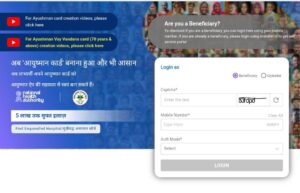
Friends, let me tell you that downloading Ayushman card is a very easy process. If your Ayushman card is already made, then you can also download your card sitting at home.
1 Step:-Login Process
✓ Click on the given link https://beneficiary.nha.gov.in/
✓ If you are an operator then choose
✓ Operator option otherwise choose
✓ Beneficiary option.
✓ Enter your mobile number and click on Verify option.
✓ Choose the mode of authentication.
✓ Please Enter your OTP and click on Login button.
2 Step:-Login Process
✓ Select the name of your state.
✓ You have to choose one of the three options in the scheme
✓ BOCW This option is for those who have a labor card made from the Labor Department.
✓ Deen Dayal Upadhyay You do not have to choose this option.
✓ PMJAY This option is for those who know their PMJAY ID.
✓ PMJAY-AAY Only Antyodaya card holders can choose this option.
✓ Select the name of the district.
✓ Keep in mind that if you have chosen BOCW in the scheme, then you have to enter its registration number in the Family ID.
✓ If you have chosen the option of PMJAY, then you have to enter PMAY Number or HHID in the family ID.
✓ If you have chosen PMJAY or AAY, then you have to enter the card number of Antyodaya card in the Family ID number.
3 Step:- Downloading Process
✓ Now your family ID will open in which you will see many options like Sr No Family Member, Father/Spouse Names, Relation, Mobile Numbers, eKYC Status, Card Status or Actions.
✓ You have to select the member in the Action column (whose Ayushman card you want to download).
✓ Now a new pop-up will open in front of you in which you have to verify your Aadhar card.
✓ Click on the Verify option.
✓ Read the T&C carefully and tick the box and click on the Allow option.
✓ Choose your authentication mode (Aadhar OTP, Aadhar Fingerprint, Aadhar Iris)
✓ Enter your Aadhar OTP and mobile OTP.
✓ Tick in front of the name of the person whose Ayushman card you want to download the card.
✓ Click on the Download option.
How to find the nearest hospital 2025?
Friends, you must have heard that our card is made but where to use it, how to know in which hospital this card will be used. Today we are going to give you complete information about this through this post. Friends, you must be aware that there are two types of hospitals around us, government and private.
Although all the government hospitals are connected with this scheme, but only a few private hospitals are connected.
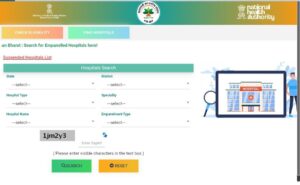
Here we are going to tell you the complete process of how to get the list of private and government hospitals in just a few steps. ✓ Click on the link given https://pmjay.gov.in/.
✓ Click on Find Hospital.
✓ Select the name of the state. Select the name of the district.
✓ Select the type of hospital (government/non-government).
✓ Select the specialty related to the disease.
✓ Select the name of the hospital.
✓ Select the type of empanelment. Eligibility for Ayushman Card
Find Hospital List: Click Here
Eligibility for Ayushman Card 2025
✓He should be a permanent resident of India.
✓He should fall under the poverty line category.
✓Name should be included in the 2011 census.
✓Ration card must be there.
✓Shramik card issued by the Labor Department.
Official Website: Click Here