How To Update Mobile Number in RC 2025:
Friends and family, as you all know, if you have recently changed your mobile number or want to ensure that it is correctly registered with the RC of your vehicle , then this article is very important and necessary for all of you. While the online process through the Transport Seva Portal is the most convenient, we will give you complete information about it here so that you will understand the entire procPUCess of changing the number in it! Keeping your contact information updated with the RTO, especially your mobile number linked to your vehicle’s registration certificate (RC), is important to receive important notifications and updates, it enables officials to contact you for insurance renewPUC updates and other important vehicle-related information!
Why Update Your Mobile Number on Your Vehicle’s RC 2025?
Timely updates and notifications: You will receive SMS alerts before your vehicle’s insurance and PUC (Pollution Under Control) certificate expires, and also get instant notification of any traffic violation or challan!
Better connectivity with authorities: If your vehicle is involved in an accident, theft or any other emergency, having the correct mobile number registered will enable authorities to contact you immediately!
Access to online services: Many online vehicle services on the Parivahan portal and M Parivahan app require OTP verification, which is sent to your registered mobile number!
Easy transfer of ownership: When you sell your vehicle, the registered mobile number makes the process of transferring ownership easier!
Documents required for RC mobile number update
✓ Aadhaar card!
✓ Mobile number linked to Aadhaar card!
✓ RC number!
✓ PAN card !
How to update mobile number in RC 2025 / How to update mobile number in vehicle RC
Now you can easily update mobile number in your vehicle’s RC sitting at home through Transport Seva Portal of Ministry of Road Transport and State Transport, so now we will tell you the complete process step by step!
✓ First of all you have to go to Chrome Browser and search its official website https://parivahan.gov.in/!
✓ As soon as its link comes in front of you, you have to click on it!
✓ Now its home page will open in front of you!
✓ Here you will get a page or new pop up like this!
✓ Now here you have to click on the vehicle QR!
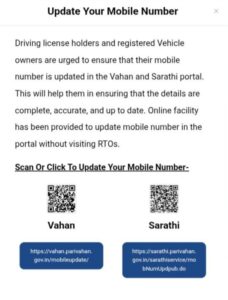
✓ After this a new page will open in front of you in which you have to enter some information before updating the number!
✓ Now here first of all you have to fill the Vehicle Registration Number!
✓ After this you have to enter the Chassis No. and after entering the Engine number you have to enter the registration number!
✓ Now after filling the Hipcha code you have to click on Validate!
✓ After this it will ask for your mobile number, now you have to fill the mobile number you want to enter here!
✓ Now you have to click on the Submit option!
✓ In this way you can update your RC number without any problem!
mobile number, now you have to fill the mobile number you want to enter here!
✓ Now you have to click on the Submit option!
✓ In this way you can update your RC number without any problem!
Website Link: Click Here